Remote Desktop Manager alternative for macOS
A lightweight Remote Desktop Manager alternative for Mac
Noden is a single-Mac, local-first client for SSH, SFTP, Windows RDP and serial console, with credentials in the macOS Keychain behind Touch ID. Devolutions Remote Desktop Manager is a much broader connection and credential platform for teams; Noden is for people who need a few protocols done well on one Mac.
Published October 6, 2026 · By Tugay Pala, Useroam Teknoloji
What is Remote Desktop Manager?
Remote Desktop Manager (RDM) from Devolutions centralizes remote connections and credentials. Devolutions lists more than 150 supported protocols, including RDP, SSH and VNC, over 200 integrations with password managers, identity providers and ticketing tools, and apps for Windows, macOS, Linux, iOS and Android. It comes in a free Solo edition for individuals and a Team edition that connects to shared vaults with role-based access control and audit trails.
Noden is deliberately smaller. It is a native macOS app for SSH, SFTP, RDP and serial console, with a credential vault stored in the Mac's own Keychain. There is no server, no account and no shared workspace — which is the point for some people and a deal-breaker for others.
Remote Desktop Manager and Noden at a glance
| Compared | Remote Desktop Manager · RDM editions · Devolutions pricing · Noden pricing |
|---|---|
| Scope | RDM: connection and credential platform, 150+ protocols, 200+ integrations. Noden: SSH, SFTP, RDP and serial console in one window. |
| Platforms | RDM: Windows, macOS, Linux, iOS and Android. Noden: macOS 13 or later only, Apple Silicon and Intel. |
| VNC | RDM: yes. Noden: no. |
| Team sharing | RDM: Team edition with shared vaults, role-based access control and audit trails. Noden: none today. Noden Team is announced but not on sale. |
| Credentials | RDM: built-in vault or your existing password manager. Noden: macOS Keychain, device-only, unlocked with Touch ID or your Mac password, TOTP codes, import from Bitwarden, 1Password, LastPass and Chrome, and the Noden Vault extension for Chrome and Firefox (Noden 2.0+). |
| Windows desktops | Noden: RDP as a tab, with RD Gateway, clipboard and file copy both ways and shared Mac folders. |
| Pricing | RDM: Solo is free; for Team, see Devolutions' pricing page. Noden: free for 5 saved connections; Pro is $5.99 your first year, then $10.99/year. |
Checked on 6 October 2026.
When is Noden a good fit?
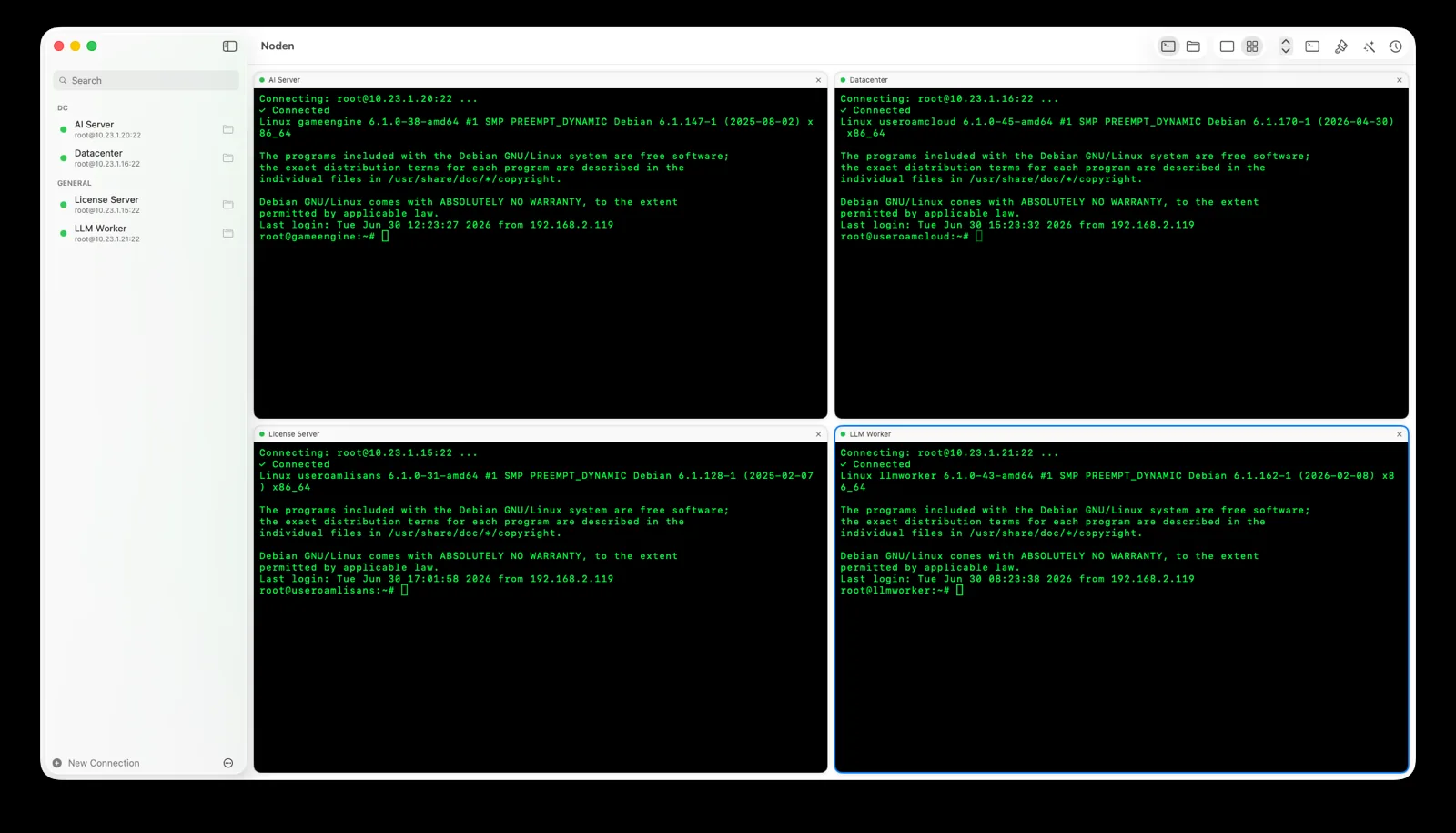
Noden suits one person, or a small team where each person keeps their own connections, working from a Mac. A typical list is a few dozen Linux servers, some Windows machines reached through an RD Gateway, and the occasional switch or firewall on a console cable. Noden handles each of those as a tab in the same window, and SSH and RDP sessions can sit side by side in a grid.
If RDM feels heavy for that list — many entry types, settings and integrations you never open — Noden has far fewer moving parts. It imports ~/.ssh/config, picks up your keys from ~/.ssh, and supports SSH tunnels and ProxyJump. A connection points at a vault item instead of holding its own copy, so rotating a password updates every terminal, SFTP, jump host and RDP entry that uses it.
Local-first also means nothing leaves the Mac: vault items stay in the Keychain with no cloud sync and no account. The browser extension fills web logins from the same vault, so router admin pages and cloud consoles use the credentials you already keep for SSH.
When is Noden not a replacement?
Noden has no team sharing today: no shared vault, no permissions, no audit trail. If several admins need the same connection list with access control, RDM's Team edition is built for that and Noden is not. Noden also has no VNC and none of the long protocol and integration list RDM offers, such as VPN management or cloud console entries.
Noden runs only on macOS and does not sync between devices. If you switch between a Windows PC, a Linux laptop and a phone, RDM's cross-platform apps are the better match.
Troubleshooting
You need to share connections with a colleague
Export an encrypted .noden backup with a passphrase and import it on the other Mac. It is a one-time copy, not a live shared vault.
Some of your entries are VNC or web
Noden does not open VNC sessions. macOS Screen Sharing handles VNC, and the Noden Vault extension fills web logins from your vault.
You want the vault on a second Mac
Vault items are device-only by design and never sync. Move them with the encrypted backup file.
You have more than five connections
The free tier holds five saved connections of any type and 20 vault items; Pro removes the limits.
Install Noden on macOS
Install the notarized app directly or with Homebrew. Apple Silicon and Intel, macOS 13 or later. The Mac App Store version is also available; the Noden Vault browser extension needs Noden 2.0 or later, which is on the direct download and Homebrew today, with the Mac App Store update on its way.
brew install --cask useroamteknoloji/tap/nodenFrequently asked questions
Is Noden a good Remote Desktop Manager alternative on Mac?
For an individual or small team on a Mac who mainly needs SSH, SFTP, RDP and serial console, yes. Noden is a native, local-first app with a Touch ID vault. Remote Desktop Manager is the better fit if you need team sharing, VNC, many more protocols or apps on Windows, Linux and mobile.
Can I share connections with my team in Noden?
Not yet. Noden has no shared vault or permissions today; Noden Team is announced but not on sale. You can move a connection set to another Mac with an encrypted .noden backup file.
Does Noden support VNC like Remote Desktop Manager?
No. Noden supports SSH, SFTP, RDP to Windows and serial console. For VNC you need another tool, such as macOS Screen Sharing or Remote Desktop Manager.
How much does Noden cost?
Noden is free for up to five saved connections of any type and 20 vault items. Pro is USD 5.99 your first year, then USD 10.99 per year for unlimited connections, full history and the AI assistant.
See also: RDP client for Mac · SSH password manager for Mac · Royal TSX alternative for Mac · SecureCRT alternative for Mac · Termius alternative for Mac