SFTP on macOS
A native Mac SFTP client
Noden is a native macOS SFTP client with a dual-pane file browser — local on one side, remote on the other — with drag-and-drop uploads and downloads and remote file editing. Because it's also an SSH client, your terminal and your files live in the same window: run a command, then move the file it produced, without switching apps.
Published July 15, 2026 · By Tugay Pala, Useroam Teknoloji
What you get
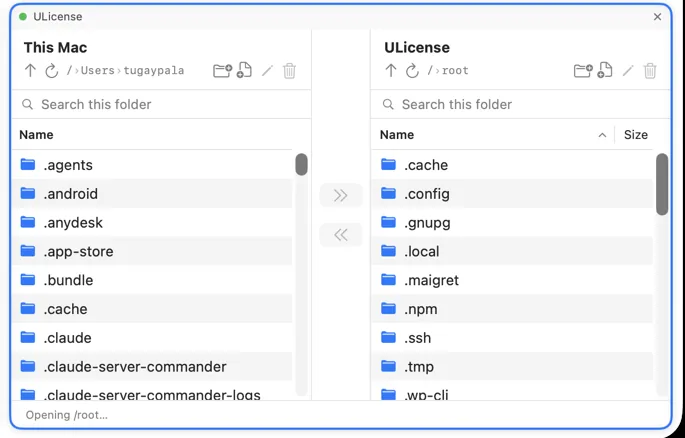
| Dual-pane browser | Local and remote side by side; navigate, transfer and organize with drag-and-drop. |
|---|---|
| Remote editing | Open a remote file in a Mac editor; saving uploads it back to the server automatically. |
| SSH in the same window | Switch between the terminal and the SFTP browser per connection; watch several sessions in a grid. |
| Keys & security | Uses your Ed25519/ECDSA keys from ~/.ssh; passwords and passphrases go in the macOS Keychain. |
| Permissions | View and change remote file permissions (chmod) from the browser. |
Why a native app matters
Noden is built with SwiftUI and notarized by Apple, so it feels like a Mac app and runs natively on Apple Silicon and Intel. You don't need a separate terminal and a separate FTP program — it's one focused tool for SSH and SFTP.
The parts that matter day to day
Dragging in and out of Finder. Files drop straight from a Finder window into the remote pane and back out again; there is no import step and no staging folder.
Editing without downloading. Open a remote file and it launches in your normal Mac editor. Save, and it uploads back automatically — which is the difference between fixing a config file in ten seconds and doing a download-edit-upload round trip.
The terminal is right there. Because the same connection carries an SSH session, you can run the command that produces a file and move the file without switching apps or re-authenticating. That is the whole reason to use a client that does both.
Permissions you can see. View and change remote file permissions (chmod) from the browser rather than remembering the octal in a shell.
The part that usually goes wrong: permissions
Most failed transfers are not transfer problems. Three checks, in order:
- Can your user write there at all?
ls -ld /target/dirshows the owner and mode of the directory itself — you need write permission on the directory to create a file in it, regardless of the file's own mode. - Is the parent path traversable? Every directory on the way needs execute (
x) for your user. A single750directory owned by someone else stops the whole path. - Are you hitting a quota or a read-only mount? Both report as a permission failure from the client side.
df -handmounton the server settle it.
If you need to write somewhere your login user cannot, the honest answer is that SFTP has no sudo. Transfer to a directory you own, then move the file with the terminal session on the same connection.
When a dedicated SFTP app is not what you want
- You only transfer files occasionally.
scpandsftpship with macOS and need no app at all. - You need FTP, FTPS or WebDAV. Noden speaks SFTP over SSH only.
- You want to mount the server as a Finder volume. Noden gives you a dual-pane browser inside the app, not a mounted drive.
Troubleshooting
You want the file manager next to a terminal, not instead of it
Pop the file commander out into its own window — it stays open beside a terminal session rather than replacing it.
A whole folder needs to go across
Drag it in either direction; Noden recreates the directory tree and copies the files recursively.
You edit a remote config and the server does not see the change
Use Edit in place so Noden uploads the file automatically on save, instead of editing a local copy.
Install Noden on macOS
brew install --cask useroamteknoloji/tap/nodenFrequently asked questions
What is a good SFTP client for Mac?
Noden is a native macOS SFTP client with a dual-pane browser, drag-and-drop transfers and remote editing, plus an SSH terminal in the same window.
Can I edit remote files over SFTP on a Mac?
Yes. Noden opens a remote file in a Mac editor and uploads your saved changes back automatically.
Is Noden's SFTP free?
Yes. The SFTP file manager and terminal are free for up to five connections. Pro adds unlimited connections, full history and AI for USD 5.99 your first year, then USD 10.99 per year.
See also: Best SSH client for Mac · MobaXterm alternative · Termius alternative · Mac SSH client guide